Changelog

Follow new updates and improvements to Chief.

Improved file interaction and user interface enhancements
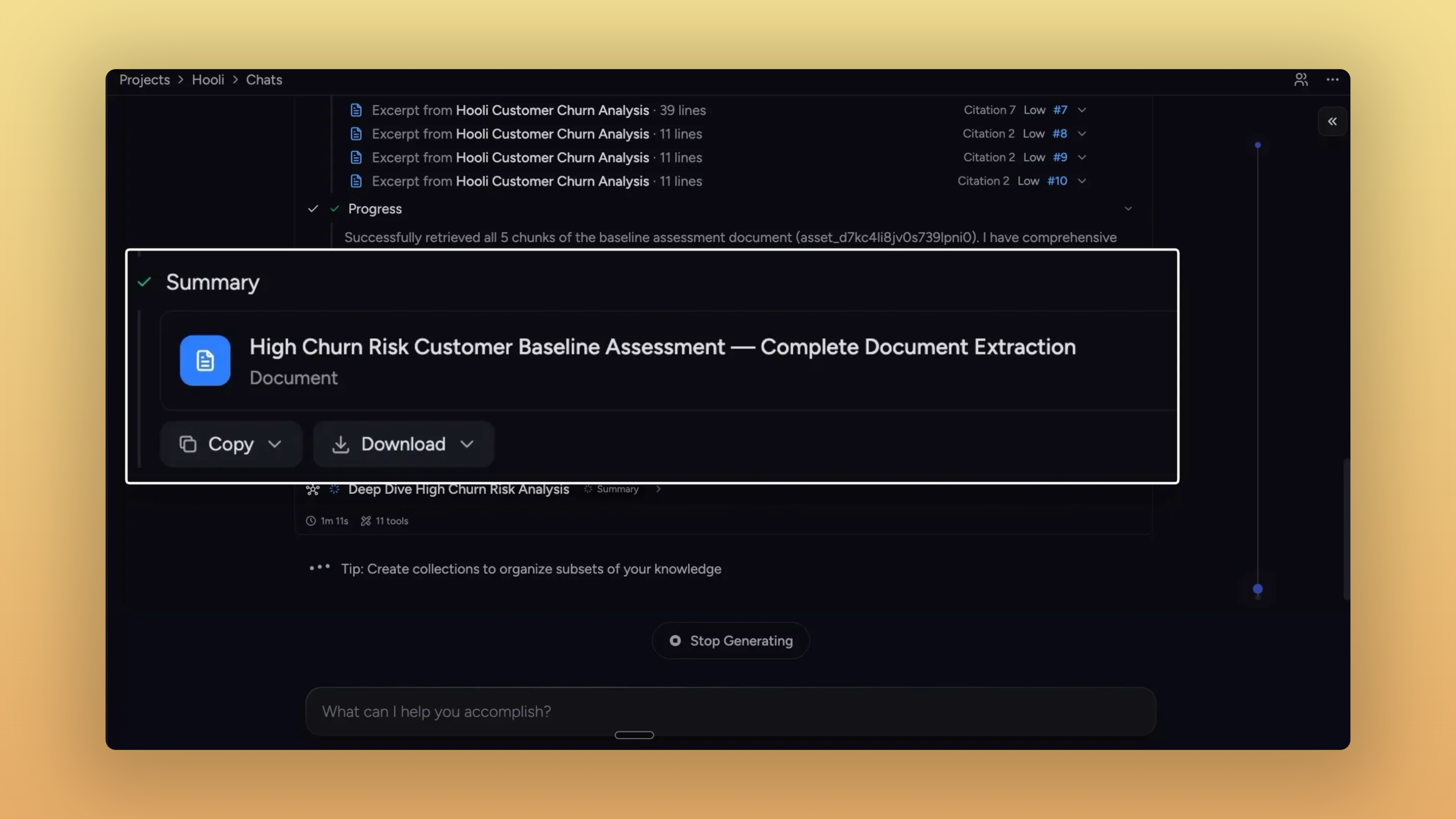
Take what Chief makes for you

The thread this stretch is what happens after Chief gives you something — reports, sub-agent outputs, action results, pasted prompts. Each one now has a clearer path out of Chief: into your library, your clipboard, or whichever file format your next step needs.


Anything Chief makes, you can take with you

If Chief made it, you can grab it.

  • Sub-agent reports get the same export controls as final answers.

    • Activity timeline: Edit, Download PDF, Add to Knowledge Base,

    • Summary and collaboration outputs: Copy + Download menu, with rich text on the clipboard.

    • Tables in those exports go cleanly to CSV or XLS.

    • Same actions appear in the side panel when you open a sub-agent doc.

  • Side-panel reports download in the format you need. PDF, Markdown, plain text, DOC — and CSV / XLS when the report contains tables.

  • Action outputs save straight to your library. Persisted as library assets with their execution metadata attached.

  • Pasted text lands in your library — with a custom title. Rename inline and save from the same dialog, no detour required.

  • One-click copy on every prompt. Skills, Personas, and Actions get a hover-revealed copy button on edit and view surfaces.

  • Bare URLs in Chief's responses are clickable. No https:// prefix needed — they open in a new tab.

  • No more collapsible markdown toggles in answers. Responses render as plain semantic headings, easy to read and copy.


Improvements

Library
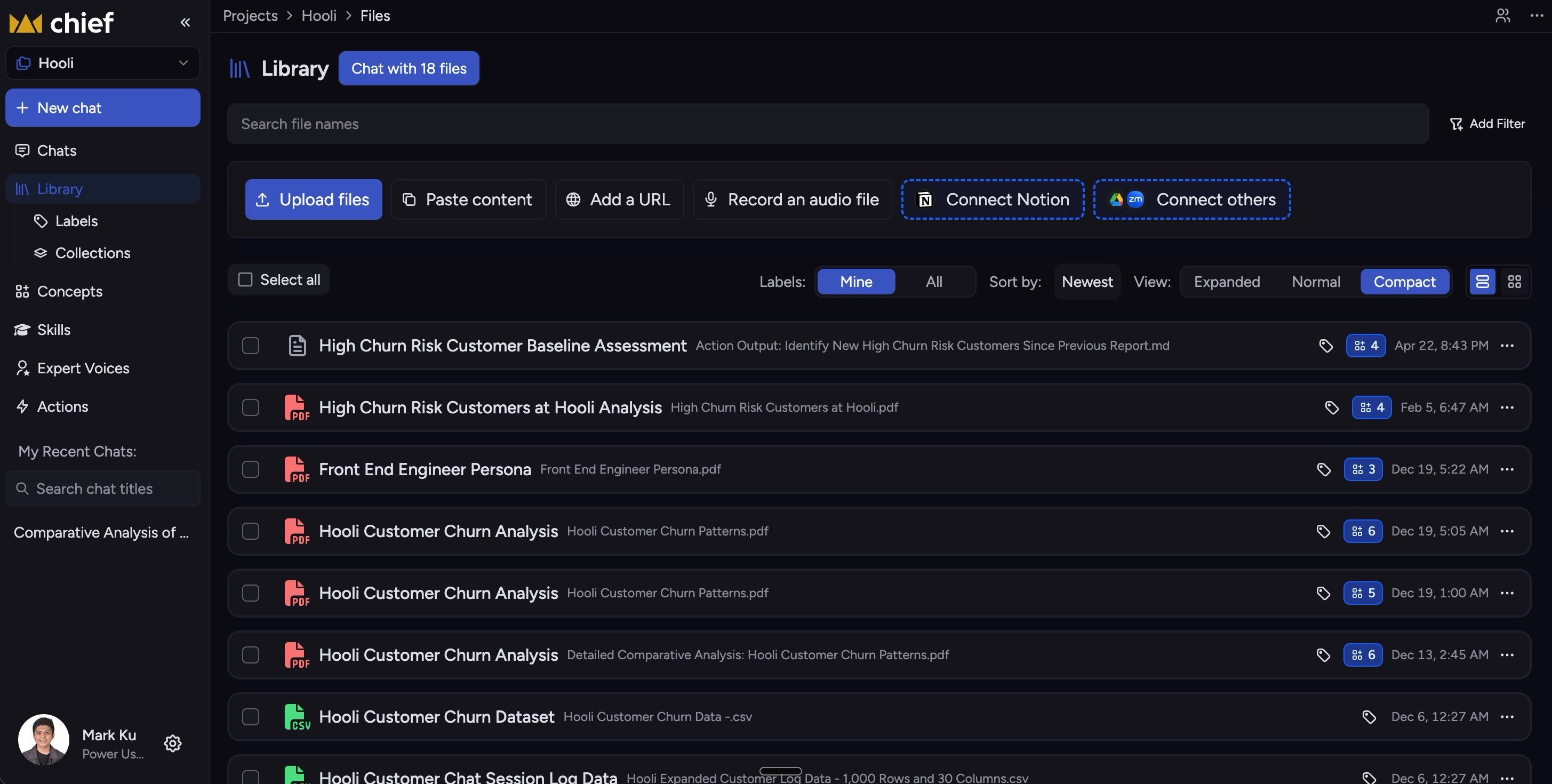
  • A new Compact view. Three-way View control — Expanded, Normal, Compact — collapses each row to a single line.

  • Toolbar lines up again. Delete, Labels, Copy, Move, Deselect now sit on one row; segmented controls match button heights.

  • Single-file chat stays single-file. Clicking Chat from an upload-progress toast scopes the chat to just that file.

  • File pages show processing status. Queued, uploading, processing, indexing, or ready — without bouncing back to the library.

  • Labels sort by who actually made them. "Created by you," "Created by Chief," and "Mine" now distinguish hand-made labels from auto-generated ones.

  • Browsable blog with label pills. Click a label on a post to browse all posts under it.

Slides & side panel
  • Arrow keys flip slides. ← and → advance and rewind anywhere a presentation is mounted; Space and Esc stay scoped to fullscreen.

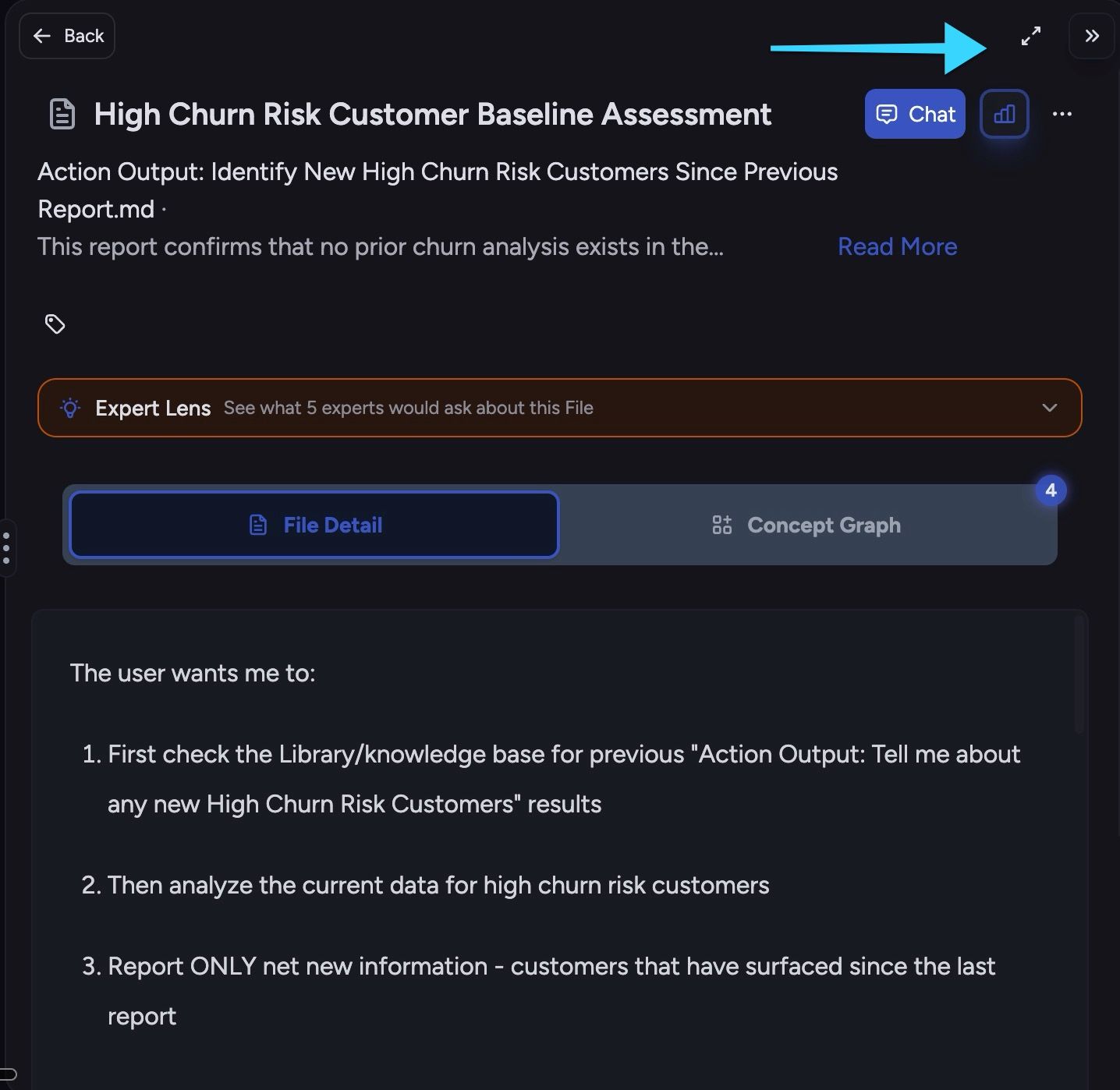
  • "Open in main view" is back. A diagonal-arrow button on the side-panel header promotes content into the main view.

Settings
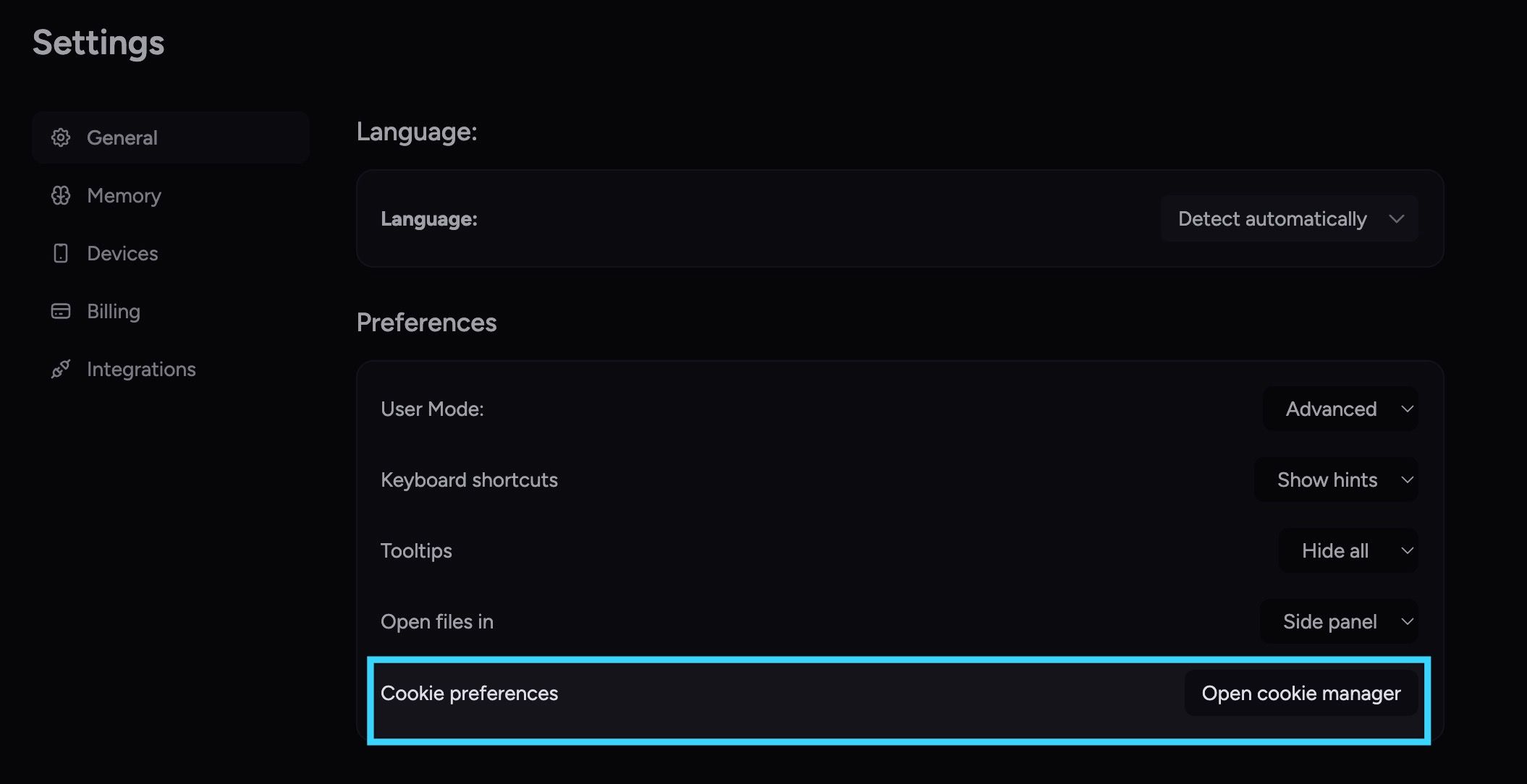
  • Cookie preferences live in Settings. A new "Open cookie manager" entry in Settings → General opens the consent drawer directly.


Fixes

Email & notifications

  • Action emails arrive once, not three times. Removed the retry loop that was firing them every two minutes.

  • Forwarded unsubscribe links can't be abused. Submitting unsubscribe now requires the recipient's email; one-click from native mail clients still works.

Files & sharing

  • Re-uploaded files become visible to Chief again. Stale asset IDs from deleted versions get dropped from chat scope on load.

  • Spreadsheet counts and warnings stop double-counting.

    • The prompt bar and sent-message header count each file once across scope and @mentions.

    • The "spreadsheet + entire library" warning clears the moment you exclude a file.

    • Adding spreadsheets through the picker after excluding a file actually commits.

  • Action-created secret share links show up in the share UI. No more digging through email to recover them.

  • Newly-made labels show their files immediately. No more empty "Contains 0 Files" right after tagging.

Drafts & prompts

  • Prompts survive network drops and credit refills.

    • Drafts persist across submit failures.

    • Offline submits auto-retry when you come back online.

    • Refilling credits mid-thread returns you to that thread, not the homepage.

  • Launchpad templates stop following you between chats. They no longer save into the project's draft slot.

UI polish

  • Activity timeline expands reliably on Chrome / Windows. First click on the grayscale spectator strip works.

  • Presentation slides don't collapse after a theme change. Switching themes no longer flattens the slide area to zero height.

  • Expert Voice Edit and Copy stay visible on long prompts. They stick to the top of the card while you scroll.

  • Action forms tell you what's missing. Submit with empty required fields scrolls the first invalid field into view and focuses it.
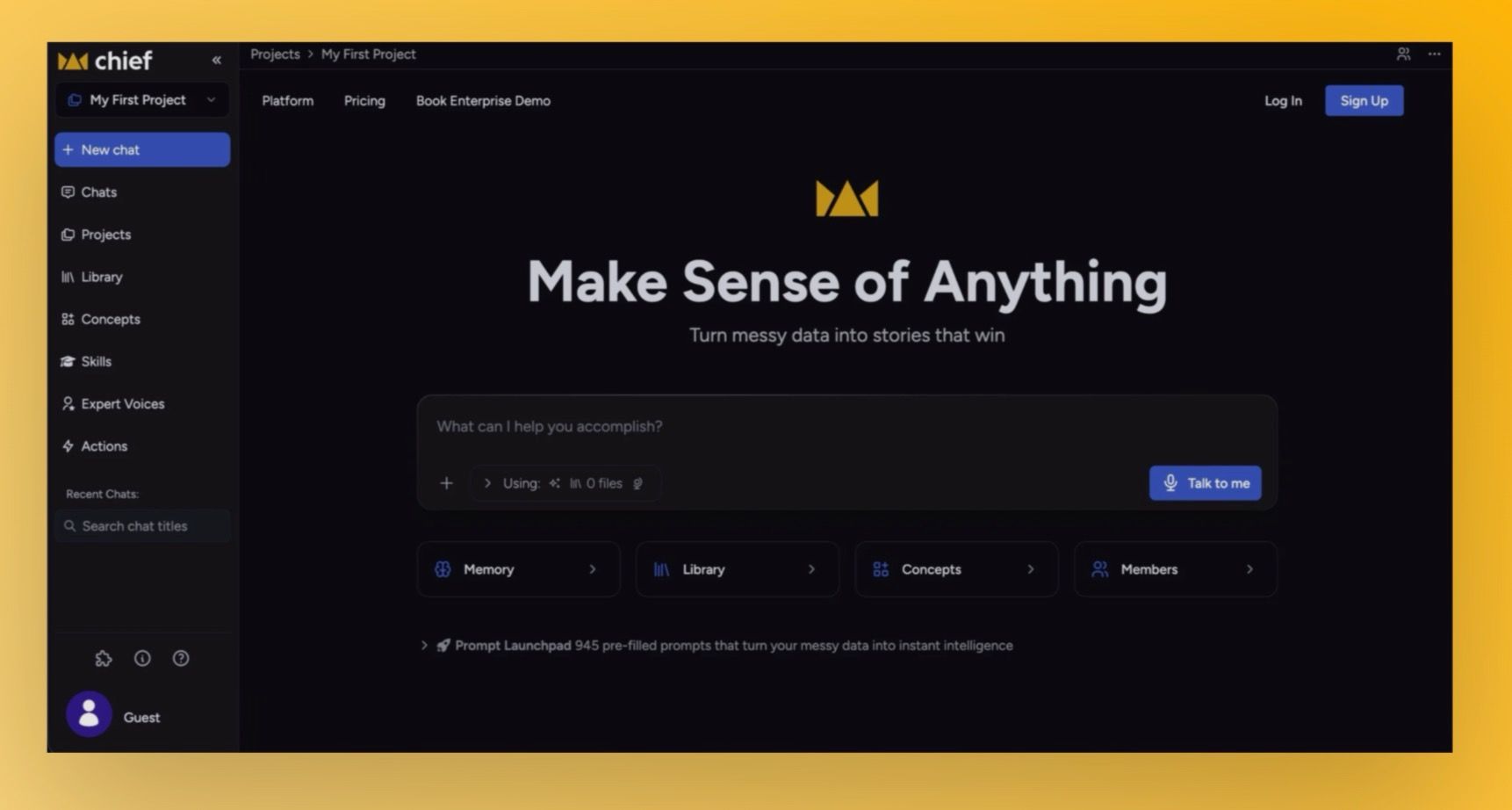

Storytell.ai is now Chief 👑

Our product has evolved into something more powerful than a knowledge platform. It's become an operating system for people who run things. That shift in behavior deserved a name change. Starting next week, we will be rebranding Storytell as Chief (think Chief of Staff).

You’ll now see Chief branding in navigation, login/signup surfaces, and key UI moments.

Why this matters:

  • You’re not learning a new product from scratch.

  • The experience reflects where the platform is headed.

  • The brand now better matches how many teams already use it: as an AI chief-of-staff layer for daily execution.

Any questions? read our FAQ here: Storytell -> Chief


🔁 Improved: Transition experience is designed to be low-friction

The rebrand rollout was shipped so your workflow can continue without migration steps.

What’s improved for users:

  • No account reset: existing credentials continue to work.

  • No data re-upload: projects, settings, and history carry forward.

  • Continuity during switch-over: previous Storytell links continue to route during the domain transition window.


🎨 Upgraded: Visual system and navigation polish

This release also includes a broad UI refresh to align with Chief’s identity:

  • Updated logos, favicon, and branded visual assets

  • Refreshed brand colors/gradients across app surfaces

  • Updated marketing/hero presentation and in-app brand moments

  • Navigation footer actions now include quick access for:

    • browser extension info

    • latest product changes

    • help/messaging entry points


🛣️ What’s coming

How Chief will evolve in the coming weeks

  • Live Sessions: Chief will listen passively during your calls and meetings — no prompting required. It surfaces real-time action suggestions, expert perspectives, and strategic cues as the conversation unfolds, so you're always the smartest person in the room.

  • Playbooks: A library of open-source, modular operating frameworks — built on proven methodologies from leaders — that Chief can execute on your behalf. Set the objective, choose the playbook, and Chief runs the coordination.

  • Voice-first interaction: Instead of just typing into a chat box, you'll also be able to speak your objectives to Chief. State what you need, and Chief organizes context, spins up agents, and surfaces next steps — no keyboard required.


Chief is the next chapter, but your day-to-day should feel familiar from day one. We’re now focused on the next wave already previewed publicly: Live Sessions, Playbooks, and voice-first workflows—all aimed at helping you stay a few steps ahead without adding operational overhead.

ImprovedUpgraded

Better Web Search: Find exactly what you need, where it lives

Searching the web is great, but sometimes "Googling it" is a bit like looking for a needle in a haystack especially when you need something really specific, like a piece of code or the latest academic research. We’ve given Storytell a serious upgrade in how it sees the web, helping it understand exactly where to look for the answers you need.


How it works:

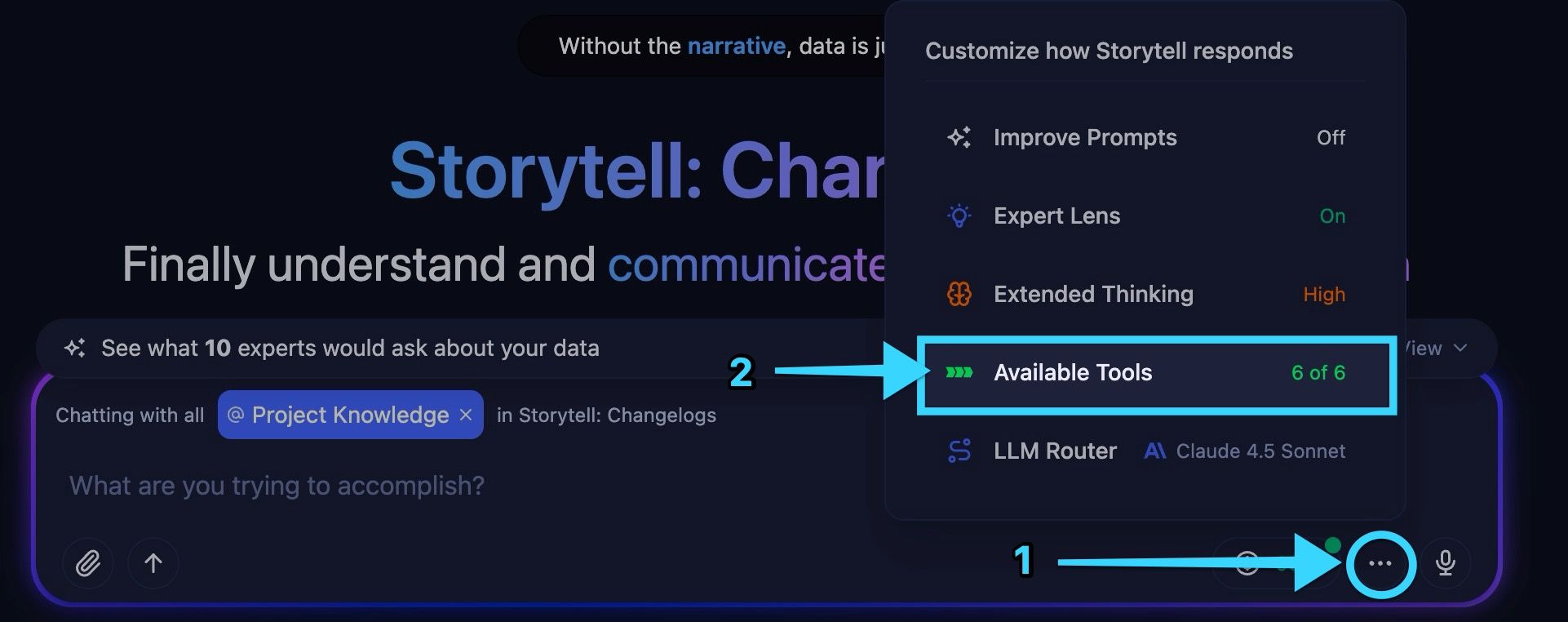
In your prompt bar, click the … icon at the bottom right, and click on Available Tools

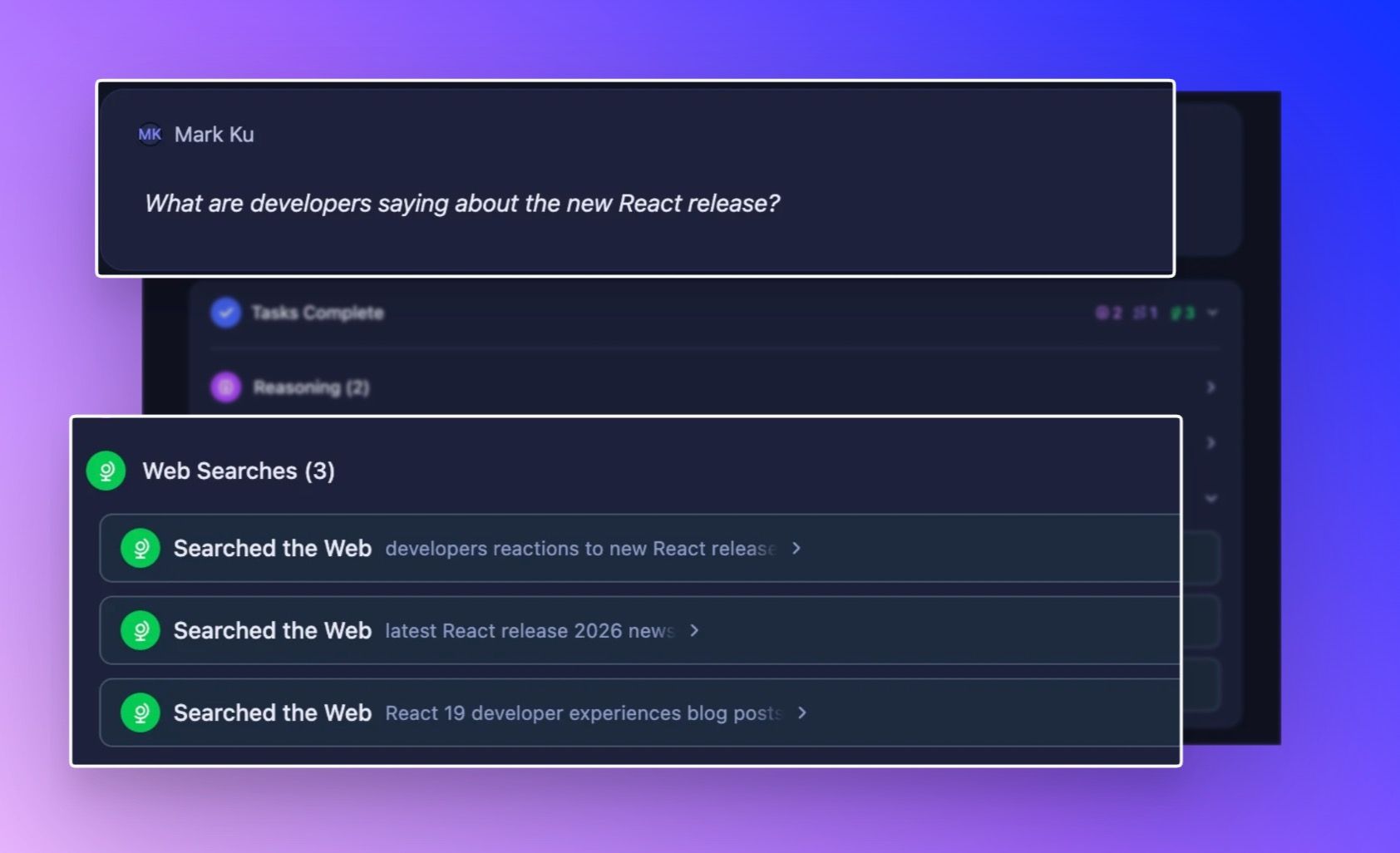
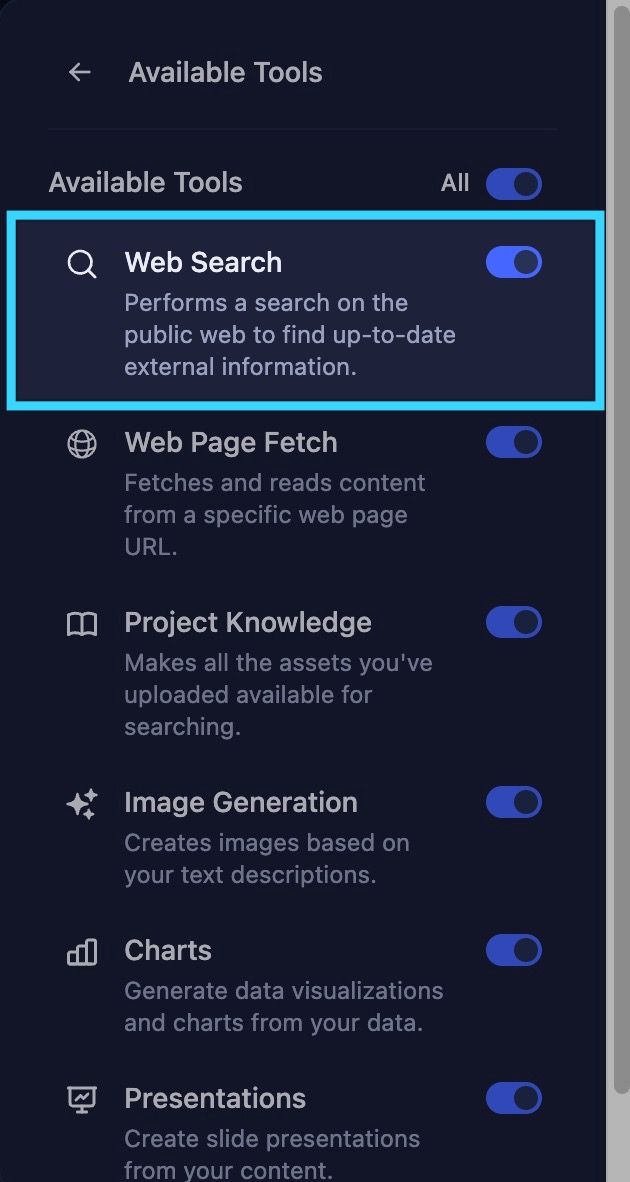
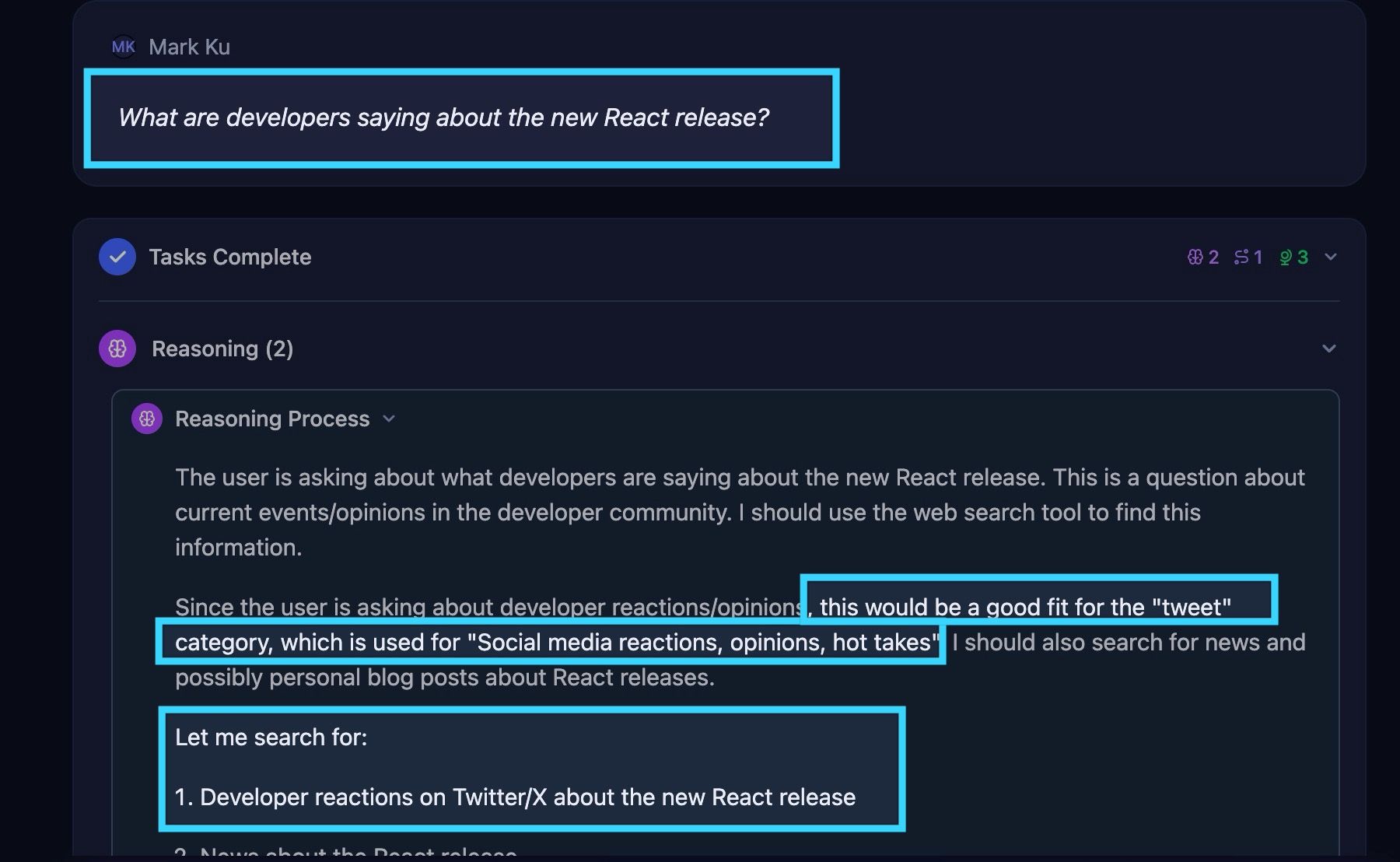
Make sure that the Web Search tool is turned ON, then just search naturally in Storytell. Storytell automatically recognizes what type of content you're looking for based on your question. Ask "What are developers saying about the new React release?" and it knows to search X. Ask "Find research on retrieval augmented generation" and it searches academic papers.

What you can now search for:

  • GitHub repositories – Need a testing framework in Go? A specific library? You'll find actual code repositories, not just articles about code

  • X (Twitter) posts – See what people are actually saying about a topic right now. Perfect for gauging sentiment, finding hot takes, or tracking reactions to news

  • Research papers – Academic sources, peer-reviewed studies, and scholarly work—without wading through blog posts and news articles

  • People – Find professionals by role, company, or expertise. Think "AI researchers at OpenAI" or "engineers who work at Amazon"

  • Companies – Search for startups, businesses, and organizations in specific industries

  • News articles – Get current events and journalism, filtered from other content types

  • Personal sites & blogs – Developer experiences, tutorials, and individual perspectives that don't show up on major platforms

  • Financial reports – SEC filings, earnings reports, and investor documents when you need official numbers

Why this matters:

iff you're looking for a specific software library, a general web search might give you blog posts about the library. But what you really want is the repository itself. Now, SmartChat™ knows the difference.

Here’s what’s new under the hood:

We’ve integrated specialized search categories that automatically activate based on your intent. This means clearer, more authoritative results for specialized queries:

  • 💻 For Developers: When you look for code libraries or frameworks, we now specifically target GitHub repositories to get you the source truth.

  • 🐦 For Trend Watchers: Want to know what people are saying right now? We can now target Tweets/X to gauge real-time sentiment and discussions.

  • 🎓 For Researchers: Ask about scientific advancements, and we’ll filter for Research Papers and academic publications, skipping the pop-science summaries.

  • 💼 For Business Analysts: We've added dedicated filters for Company data (great for finding startups), Financial Reports (perfect for earnings season), and People (for finding specific roles or professionals


Upgraded

Earlier updates