Multi-Agent Architecture & Specialized Agents
Learn how the Chief AI platform uses specialized agents to handle complex tasks efficiently through intelligent delegation and parallel execution.
Written By Mark Ku
Last updated 6 months ago
Overview
Historically, getting answers from data required knowing exactly what to ask — users had to write queries and "pull" answers out of their information. This is a fundamental limitation in the enterprise, where people work in silos and don't know what they don't know.
Chief’s multi-agent system flips this model. Instead of a single AI attempting to process everything within a limited context window, Chief can deploy multiple specialized agents that work simultaneously to "push" relevant signal to the people who need it — before they even know to ask.
The platform's orchestrating agent analyzes your request, decomposes it into specialized subtasks, deploys dedicated agents to execute those tasks in parallel, and synthesizes their findings into a single, comprehensive response. Each specialized agent operates with its own 200,000+ token context window and focused toolset, enabling the system to handle research at a scale no single agent could manage alone.
Real-world example: A venture capital firm asked Chief to research all 57 of their portfolio companies simultaneously. The system deployed 57 dedicated agents — one per company — each performing 8–11 targeted searches autonomously. The result was a comprehensive report on all 57 companies, a task that previously ran out of tokens after covering just 9.
Available specialized agents
Chief includes five specialized agent types. Each is optimized for different work.
⚠️ Important: Agents are only available in Deep Intelligence mode, which requires at least a $20/month Pro plan. You can upgrade your account here
General Agent
The General agent is the default orchestrator with access to all available tools. It handles:
Task coordination and delegation
Multi-step workflows that need diverse capabilities
Situations where the task doesn’t clearly map to one specialty
When to use: Default for general-purpose requests, or when the work spans multiple specialties.
💡 Tip: The General agent often delegates rather than doing everything inline—it’s the coordinator for complex workflows.
Explorer Agent
The Explorer agent specializes in web research and external information. It is optimized for:
Internet research and fact-checking
Reading and analyzing web pages
Synthesizing findings from multiple online sources
Cross-referencing claims across sites
Research methodology
Start broad — Map the landscape with an initial pass.
Go deep — Read primary sources fully when it matters.
Verify — Cross-check important claims across sources.
Synthesize — Organize results with clear attributions.
Quality standards
Cites factual claims with source URLs where possible
Notes confidence (e.g. well-established vs single-source)
Calls out gaps, conflicts, or missing information
Prefers recent sources when timeliness matters
When to use: External web research, current events, or anything not covered by your internal knowledge base.
Librarian Agent
The Librarian agent specializes in your internal document library. It excels at:
Searching across uploaded documents
Extracting points from spreadsheets and structured files
Synthesizing across multiple internal sources
Surfacing connections across documents
Search strategy
Identify topics (finance, HR, engineering, and so on).
Match topics to relevant assets using descriptions and metadata.
Prefer multiple focused queries over one overly broad query.
Revisit the same assets from different angles when needed.
Best practices
Use natural language—not keyword stuffing.
Break big questions into targeted searches.
Prefer assets whose descriptions match the topic.
Cite document sources clearly in the answer.
When to use: Deep exploration of your files, internal KB questions, or proprietary analysis.
Researcher Agent
The Researcher agent combines Explorer and Librarian. It is designed for:
Research across both web and internal sources
Cross-referencing external findings with internal documents
Unified summaries with clear attribution (web vs internal)
Research strategy
Start from internal knowledge to see what you already have.
Use the web for updates, external context, or missing pieces.
Cross-reference and resolve conflicts explicitly.
Quality standards
Cites web URLs and document names
Notes when internal and external sources disagree or complement each other
Surfaces gaps and uncertainty
Prefers authoritative sources when available
When to use: End-to-end research that must merge private docs and the public web.
Plan Agent
The Plan agent focuses on gathering context and producing structured execution plans for complex, multi-step tasks. It can:
Pull context from knowledge bases and web search
Return a structured plan with recommended next steps
Suggest which agent types fit each step
When to use: Big, ambiguous projects where you want a plan first, or explicit step-by-step recommendations before execution.
How agent delegation works
The three-stage orchestration process
When a task warrants agent delegation, the system follows a consistent three-stage process:
Stage 1 — Master Planning & Task Decomposition The main orchestrator analyzes your request, breaks it into specialized subtasks, identifies required tools and data sources for each, and determines how many agents to deploy and of which type.
Stage 2 — Parallel Agent Deployment & Execution Each deployed agent operates as an independent entity with its own context window and specialized toolset. Agents autonomously select and execute the tools they need (web search, knowledge base queries, structured data queries, etc.) and report back incremental progress as they work. Multiple agents run simultaneously.
Stage 3 — Result Aggregation & Synthesis The main orchestrator collects results from all agents as they complete their tasks, integrates findings from all parallel research streams, and generates a comprehensive final response — delivered in whatever format you requested.
Delegation decision process
The main agent decides to delegate when:
Task complexity — The task requires many tool calls that would consume too much of the main context window
Specialization needed — The task clearly benefits from a specialized agent's expertise
Parallelization opportunity — Multiple agents can work simultaneously on different aspects
Resource management — Delegating prevents hitting execution limits in the main agent
Important: If you can accomplish the task with 1–3 direct tool calls, do NOT delegate to an agent. The overhead is not worth it. Delegation adds latency and resource overhead — reserve it for genuinely complex tasks.
Good delegation use cases
✅ Research tasks requiring multiple web searches with follow-up queries "Research the latest developments in quantum computing"
✅ Deep knowledge base exploration across many documents "Find all information about our authentication system across docs"
✅ Complex analysis requiring 4+ tool invocations "Analyze competitor pricing strategies across their websites"
✅ Parallel execution opportunities Launch multiple Explorer agents to research different topics simultaneously
✅ Planning complex multi-step workflows before execution
Using agents in the UI
Automatic vs. explicit agent selection
Chief automatically evaluates the complexity of your prompt and decides whether agents are needed — and if so, how many. This happens behind the scenes without any action required from you.
Automatic selection (default): Chief evaluates your prompt's complexity and selects the right agents autonomously. For simpler tasks, it works in single-agent mode. For deep research, multi-source analysis, or tasks that would exceed context window limits, it automatically activates and deploys the appropriate agents.
Explicit selection: When you want direct control, you can instruct Chief precisely:
💡Tip: For most complex tasks, simply appending "use agents" to your prompt is sufficient. Chief will evaluate the task and deploy the right number and type of agents automatically.
Selecting specific agents in prompts
When agents are enabled, you can explicitly specify which agent to use for your task:
Type
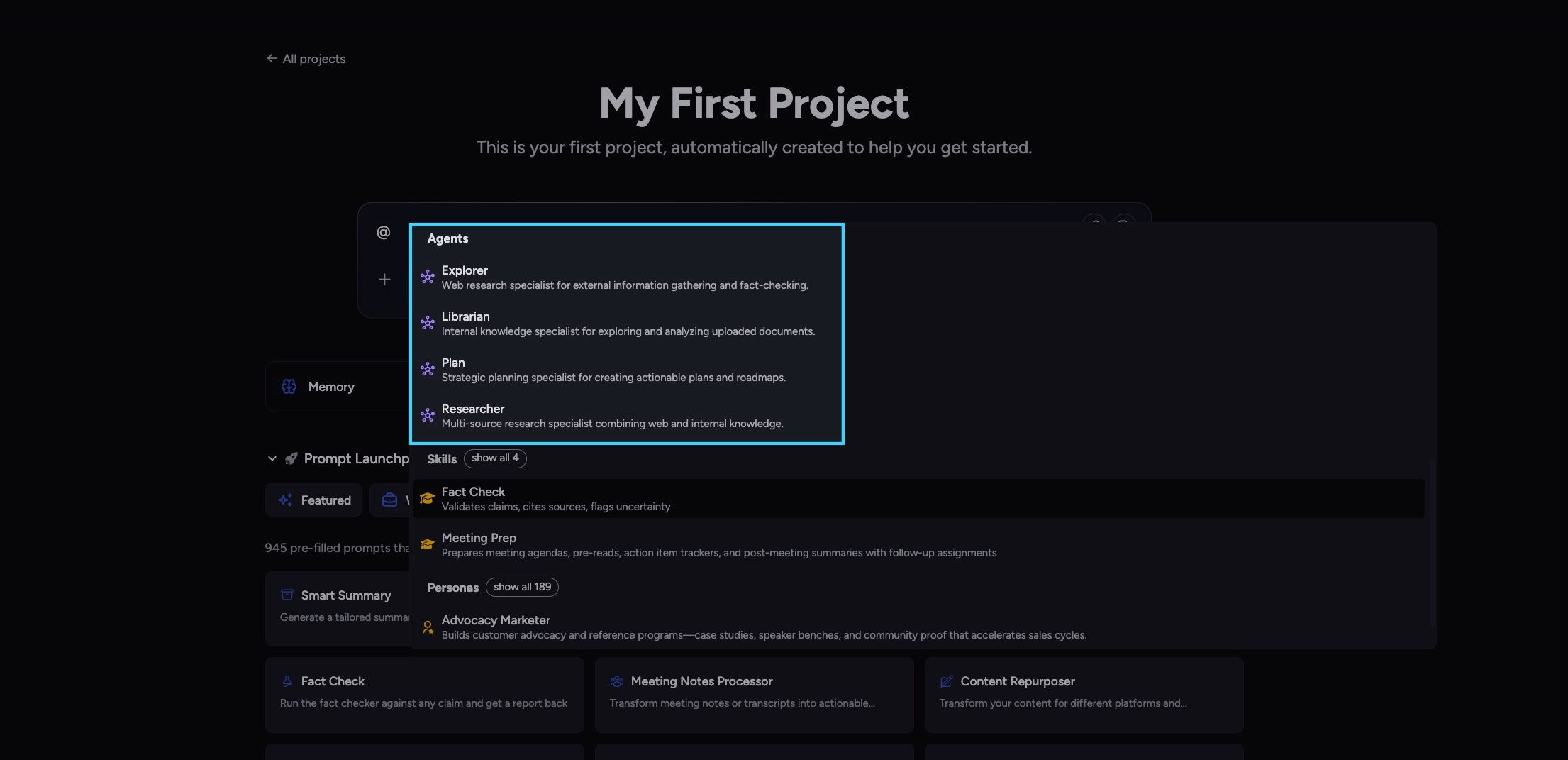
@in the prompt bar to open the mention menuBrowse available agents: You'll see Explorer, Librarian, and Researcher listed
Select an agent: Click on the agent you want to use
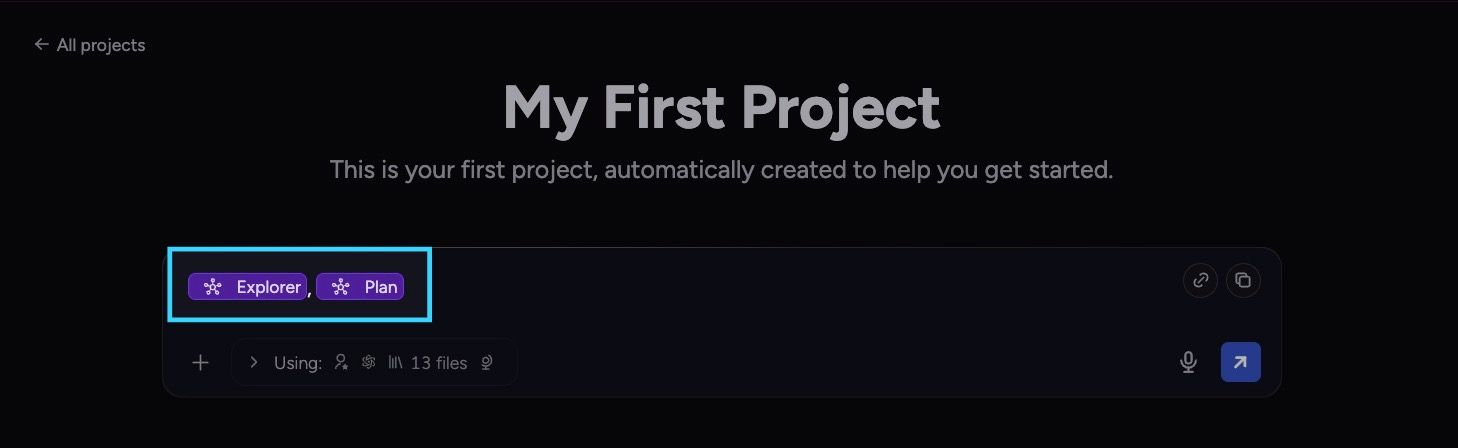
Agent badge appears: The selected agent appears as a violet badge in your prompt
Available agents in the UI:
Explorer: Web research specialist
Librarian: Internal knowledge specialist
Researcher: Multi-source research specialist
Example prompt with agent selection:
@Explorer Research the latest developments in quantum computing When you include an agent mention in your prompt, the system will prioritize using that specific agent for the task, rather than letting the main agent decide automatically.
Agent badges and visual indicators
Selected agents appear as violet badges in your prompt with:
Robot icon: Visual indicator that this is an agent mention
Agent name: The name of the selected agent (Explorer, Librarian, or Researcher)
Remove option: Hover over the badge to see an X button for removing the agent selection
Removing an agent selection:
Hover over the agent badge
Click the X button that appears
The agent mention is removed from your prompt
💡 Tip: You can include multiple agent mentions in a single prompt if you want to use different agents for different parts of your request. The system will intelligently route each part to the appropriate agent.
Agent configuration and limits
Tool access filtering
Each specialized agent only has access to tools relevant to its purpose:
This filtering keeps agents focused on their specialization and prevents wasted context on irrelevant tools.
Scalability and execution limits
Chief imposes no hard limit on the number of agents that can be deployed simultaneously. The system scales to the size of your task — from a single specialized agent to dozens working in parallel.
Practical limits per execution:
Agents track their resource consumption and gracefully handle budget exhaustion by returning partial results. A shared token budget of 125,000 tokens is tracked across all agents in a given turn.
Tool preferences
Agents can define tool preferences that guide their usage patterns:
Prefer when — Conditions where a tool should be prioritized
Use before — Tool execution order recommendations
Avoid when — Conditions where a tool should be skipped
These preferences help agents make better tool selection decisions during execution.
Best practices for agent selection
Choosing the right agent
Delegation patterns
Sequential delegation Main agent → Plan agent (creates plan) → Execute plan steps with appropriate agents
Parallel delegation Main agent → Multiple Explorer agents (research different topics simultaneously) → Synthesize results
Hierarchical delegation Main agent → Researcher agent → Researcher delegates to Explorer and Librarian → Results flow back up
Iterative delegation Main agent → Agent completes task → Main agent analyzes results → Delegates follow-up tasks if needed
FAQ
How does Chief decide which agent to use?
How does Chief decide which agent to use?
The main agent analyzes the user's request and selects an appropriate specialized agent based on:
Task requirements (web research vs. internal documents vs. both)
Complexity (simple tasks use direct tools, complex tasks delegate)
Available tools needed for the task
Resource constraints and execution limits
You can also explicitly specify an agent type when using the task tool.
Can agents delegate to other agents?
Can agents delegate to other agents?
Yes! Agents can delegate to other specialized agents. For example, a Researcher agent might delegate web research to an Explorer agent while handling knowledge base searches itself. This creates a hierarchical delegation structure.
What happens if an agent hits its execution limits?
What happens if an agent hits its execution limits?
When an agent hits its limits (max turns, max tool calls, timeout, or token budget), it returns a partial result with:
All findings collected up to that point
Execution metadata showing what was completed
Structured error indicating why execution stopped
Guidance for the parent agent on whether to retry
The parent agent can then decide whether to continue with the partial results or delegate a follow-up task.
How are agent results integrated into the main response?
How are agent results integrated into the main response?
Agent results are integrated through:
Structured summary: Condensed findings added to parent agent's context
Tool UI outputs: Rich outputs streamed directly to the frontend
Synthesis: Parent agent incorporates findings into its final response
The parent agent maintains full control over how to use the specialized agent's results.
How are agent results integrated into the main response?
How are agent results integrated into the main response?
Agent results are integrated through:
Structured summary: Condensed findings added to parent agent's context
Tool UI outputs: Rich outputs streamed directly to the frontend
Synthesis: Parent agent incorporates findings into its final response
The parent agent maintains full control over how to use the specialized agent's results.
What's the difference between General and other agents?
What's the difference between General and other agents?
The General agent:
Has access to ALL tools (no filtering)
Is the default orchestrator
Typically delegates to specialized agents rather than doing work directly
Used when task requirements don't clearly fit a specialization
Specialized agents:
Have filtered tool access (only relevant tools)
Are optimized for specific use cases
Execute tasks autonomously within their specialization
Return results to the parent agent
How do I know which agent was used for my task?
How do I know which agent was used for my task?
Agent execution metadata includes:
Agent type name
Tool calls made
Execution duration
Tokens consumed
Completion status
This information is available in the execution result and can be displayed in the UI.
Still need help? Ask the team