How Chief creates Concepts
Learn how Chief automatically identifies and builds Concepts from your files—no tagging, labeling, or setup needed.
Written By Patrick Intervalo
Last updated 6 months ago
Overview
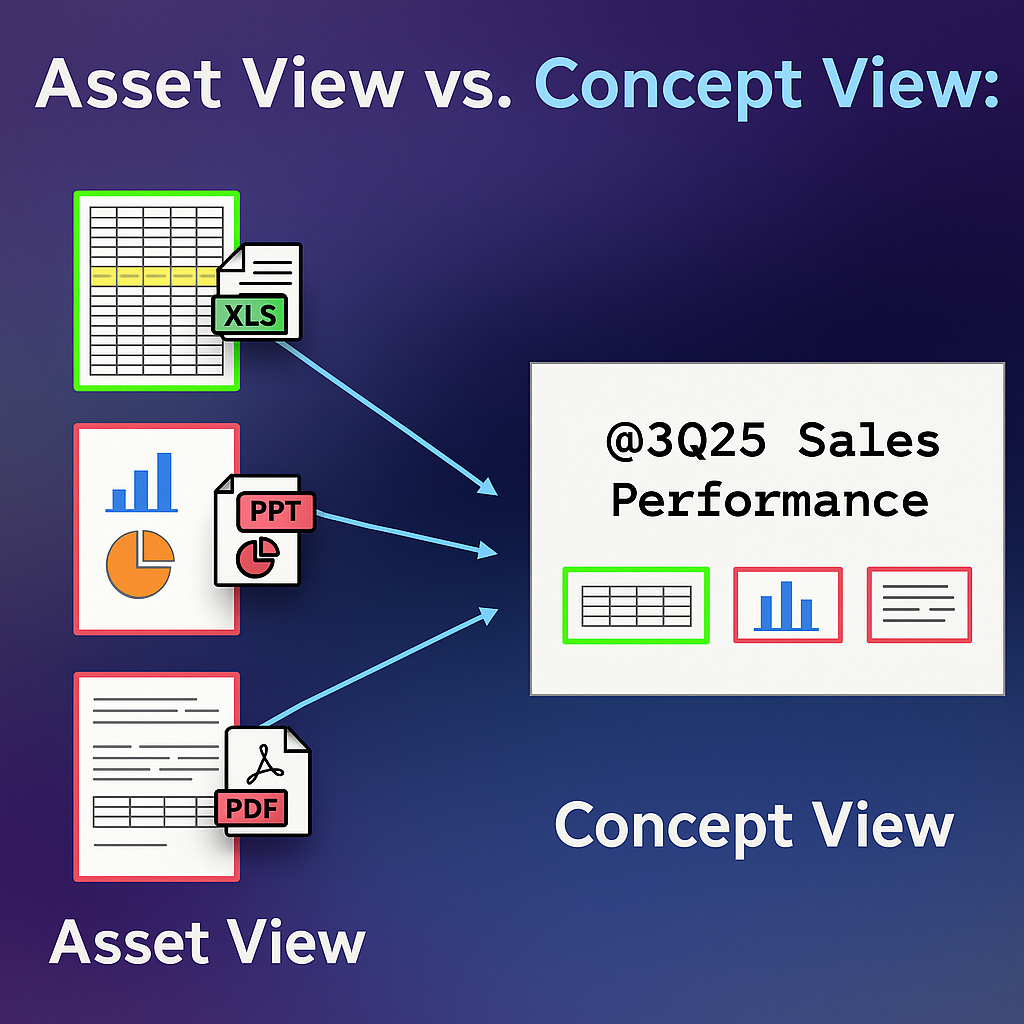
Concepts in Chief aren’t something you have to build—they emerge from your content. As you upload files or import data, Chief analyzes everything behind the scenes to identify meaningful patterns: recurring names, topics, projects, and more. These patterns become "Concepts," giving you a structured way to view and interact with scattered knowledge.
How It Works
1. Entity Detection Across Files
As soon as files are uploaded, Chief scans for recurring terms and phrases that appear to hold meaning. These can be company names, product lines, key people, or abstract themes like "launch strategy."
2. Relevance Engine
Chief doesn’t just pick up every repeated word—it evaluates context. A name that appears across multiple decks and transcripts is more likely to become a Concept than a one-off mention. It also takes note of proximity to other important ideas to determine if there’s a relationship worth surfacing.
3. Concept Creation
Once a theme or entity reaches a relevance threshold, Chief automatically turns it into a Concept. This includes:
A title (based on the name or phrase)
A summary
A list of source snippets from across your files
Links back to the original documents
You’ll soon be able to trace where each insight came from, making it even easier to validate, reference, or dive deeper into the context.
4. Continuous Enrichment
Every time you add new content to Chief, existing Concepts are re-evaluated. New information gets added to the right Concept automatically, ensuring your view is always up to date without you lifting a finger.
Note: If you delete a file from Chief, any references from that file will also be removed from the relevant Concepts.
Concepts aren’t just smart—they’re self-starting. Just bring your data, and Chief does the rest.
Still need help? Ask the team